AI Tool Savings

Hands-on test + real-user review synthesis

MailerLite Review 2026

We tested the core MailerLite workflow as a new user, captured the interface, verified current plan limits, and cross-checked our conclusions against thousands of current user reviews.

Portrait of Kyle, software reviewer at AI Tool Savings

Reviewed by Kyle

Software reviewer at AI Tool Savings

Hands-on testing: June 2026Last updated: July 26, 2026How we test software

Quick verdict

A clean email marketing workspace that earns its “Lite” name

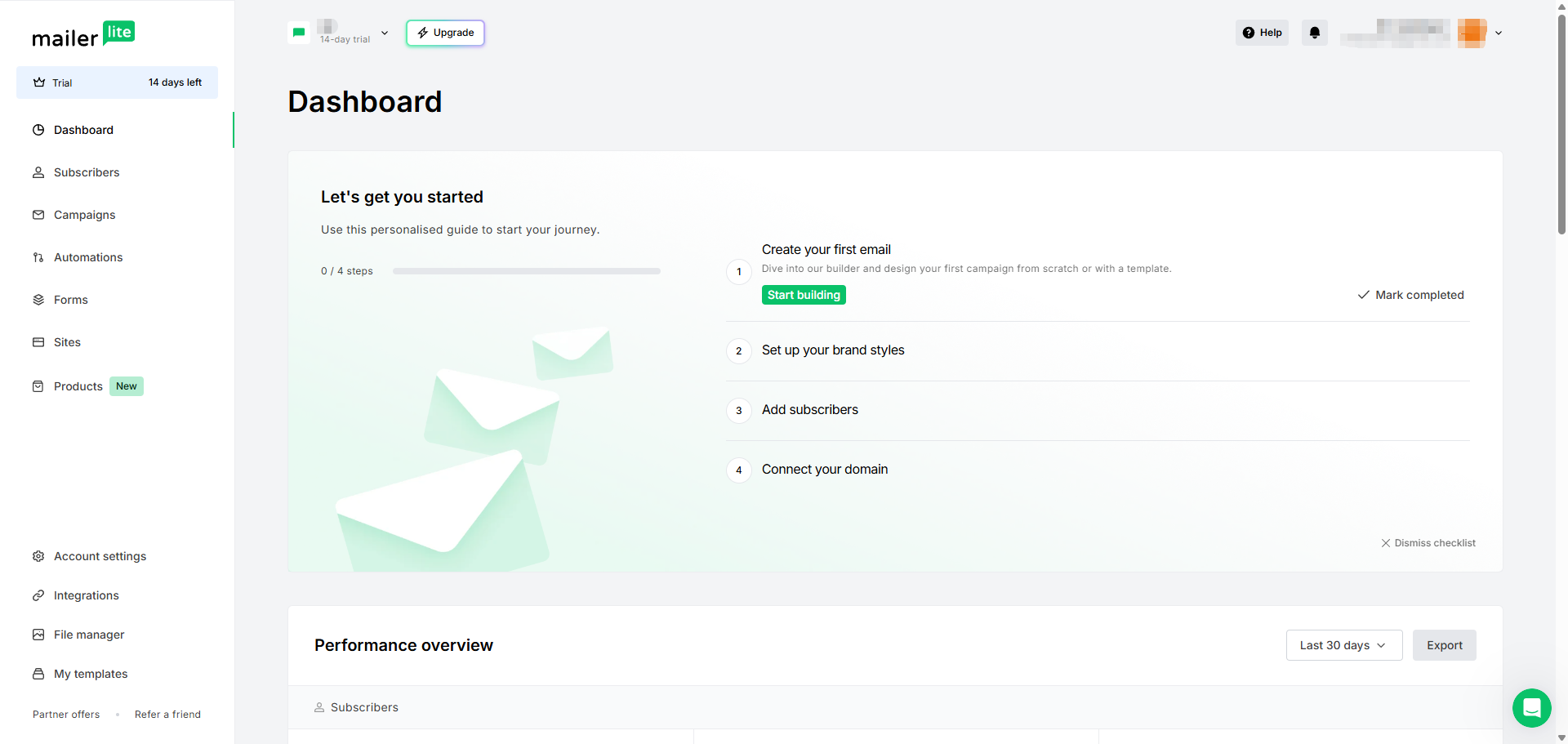
In our test account, MailerLite kept campaigns, subscribers, automations, forms, landing pages, and reporting easy to locate. That first-hand impression matches the strongest theme across current G2 and Capterra reviews: creators and small teams can become productive without learning a heavyweight marketing system.

Core appeal
Professional newsletters, forms, landing pages, segments, and simple automation without much operational overhead.
Best buying lens
Choose it for a focused email workflow. Add specialist tools only when CRM, attribution, or lifecycle complexity demands them.
MailerLite dashboard showing onboarding checklist, trial status, and left-side navigation.
View full-resolution screenshot

Verified evidence

MailerLite's dashboard keeps the core workflow visible: campaigns, subscribers, automations, forms, sites, and account settings.

Observed
June 2026
Evidence point
Clean dashboard navigation and beginner-friendly onboarding.

Pros and cons

Pros

  • The dashboard makes the core workflow easy to understand: subscribers, campaigns, automations, forms, sites, and templates are visible without a heavy CRM layer.
  • The email editor is visual and structured, which helps non-designers create clean newsletters quickly.
  • The template library gives creators and small teams practical starting points for common campaign types.
  • The automation builder is readable enough for welcome flows, lead magnet delivery, promotions, and basic nurture sequences.
  • Landing pages, forms, campaigns, and follow-up emails can live in one lightweight marketing workspace.

Cons

  • The current Free plan is better treated as a testing tier than a long-term growth plan.
  • The automation model is not built for enterprise lifecycle orchestration or deep product-event logic.
  • MailerLite should not be treated as a full CRM replacement for pipeline ownership or sales workflows.
  • Transactional email and SMS are not part of the core MailerLite marketing workflow and should be evaluated separately.
  • Advanced ecommerce attribution, click maps, and revenue reporting need separate verification with the relevant integrations connected.

Best for / Avoid if

Best for

  • Newsletter creators who want a clean writing and sending workflow.
  • Solopreneurs who need email campaigns, forms, and landing pages without managing several tools.
  • Small businesses that send regular updates, promotions, and simple nurture sequences.
  • Course creators or digital product sellers who want lightweight lead capture and follow-up flows.
  • Lean marketing teams that value speed, clarity, and low operational complexity.

Avoid if

  • You need a full CRM with pipeline stages, sales ownership, lead scoring, and deal tracking.
  • Your lifecycle automation depends on many product events, deep scoring, or complex multi-path journeys.
  • You need native SMS marketing inside the same campaign builder.
  • You need transactional product emails such as password resets, receipts, OTPs, or app notifications inside the MailerLite marketing workflow.
  • You need advanced multi-touch revenue attribution or deep ecommerce reporting without additional integrations.
  • You want a long-term free plan for growing beyond 250 subscribers.

How we tested

Product evidence first, review consensus second

We walked through the product as a new user, captured the interfaces that matter to a buying decision, checked current plan limits, and then used public reviews to test whether our impressions were broadly shared.

  1. New-user walkthrough

    We checked onboarding, navigation, campaigns, the editor, forms, audience tools, automations, reporting, and account settings.

  2. Original screenshots

    Seventeen screenshots were captured in June 2026. This review shows the seven that best support the purchase decision.

  3. Current user reviews

    G2, Capterra, Trustpilot, and Reddit were checked for repeated strengths, limitations, and buyer objections.

  4. Official plan verification

    Plan names, subscriber limits, sending limits, and automation caps were checked against current MailerLite documentation.

Public review evidence

Users reinforce the same strengths we saw in the product

Reviews checked: July 23, 2026

These are condensed editorial summaries rather than copied testimonials. The purpose is to show recurring buyer patterns, not spotlight isolated extremes.

G2 and Capterra show consistently high ratings. We keep their scores separate rather than inventing a blended score, because the platforms use different samples and may contain overlapping users.

How to read the numbers: Several recent Capterra reviews were vendor-referred or incentivized, while open forums naturally attract people with urgent problems. We prioritize themes that repeat across sources and match observable product evidence.

Representative review themes

A small-business team could build professional campaigns from day one without specialist skills, which is exactly where MailerLite's focused interface pays off.
Condensed from a May 2026 G2 review · G2
An ecommerce marketer found automations, reporting, Shopify tracking, and support practical for running day-to-day email marketing.
Condensed from a June 2026 Capterra review · Capterra
Long-time users value the simpler workflow, while some want more predictable plan transitions and clearer support expectations as their needs grow.
Condensed cross-platform buying consideration · Trustpilot and Reddit

Public platform ratings are snapshots and may change. We use them to validate product fit, not to replace first-hand evidence.

Source record

Public evidence used for this synthesis

SourceCheckedWhat it supports
G2 MailerLite reviewsJul 23, 20264.6/5 and 1,105 reviews; ease of use, editor value, segmentation, UI friction, CRM and automation limits.
Capterra MailerLite reviewsJul 23, 20264.7/5 and 2,318 reviews; ease 4.6, service 4.8; support, ecommerce attribution, 2FA, pricing, and review-source disclosures.
Trustpilot MailerLite reviewsJul 23, 2026Plan-change, billing, and support expectations used as practical buyer checks.
Reddit: MailerLite campaign discussionJul 23, 2026Domain-verification friction, free-plan awareness, support experiences, and pricing-change reactions.
Reddit: account-review discussionJul 23, 2026Operational downside reports plus community counterpoints about consent, verification, list hygiene, and warming.
Official MailerLite pricingJul 23, 2026Free, Comfort, Power, Enterprise; current subscriber, sending, automation, asset, and support limits.
Official plan and billing guideJul 23, 2026June 16, 2026 pricing introduction, usage counting, upgrade behavior, and feature caps.

Workflow suitability

Newsletter workflow: strong for content-heavy senders

The newsletter workflow is where MailerLite feels most natural. In our test account, the main navigation made the core jobs obvious: create campaigns, manage subscribers, build forms, open automations, launch simple sites, and review performance.

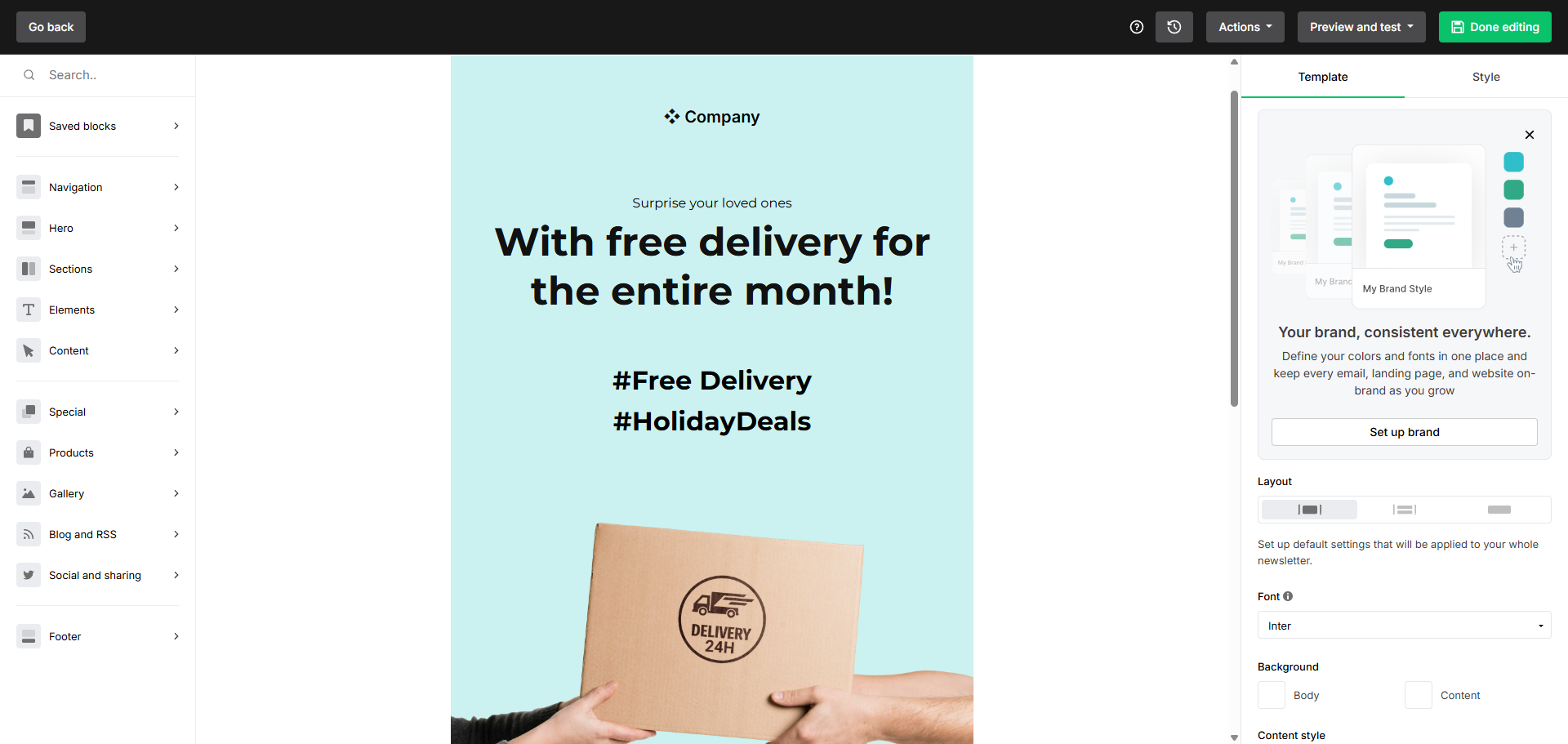
The email editor uses a structured drag-and-drop workspace. You build campaigns from content blocks and adjust styling through the editor interface instead of editing raw HTML or wrestling with layout code.

This makes MailerLite especially useful when email content is the main output: newsletters, product announcements, educational sequences, simple promotional emails, and audience updates.

  • Best use case: recurring newsletters and clean campaign production for creators or small teams.
  • Verify before committing: template access, branding controls, personalization needs, and the send limits on the plan you choose.
MailerLite drag-and-drop email editor with content blocks and style settings.
View full-resolution screenshot

Verified evidence

The email editor uses a visual canvas with content blocks and style controls, making newsletter creation approachable for non-designers.

Observed
June 2026
Evidence point
Visual drag-and-drop email editing.

Workflow suitability

Automation workflow: good for simple sequences

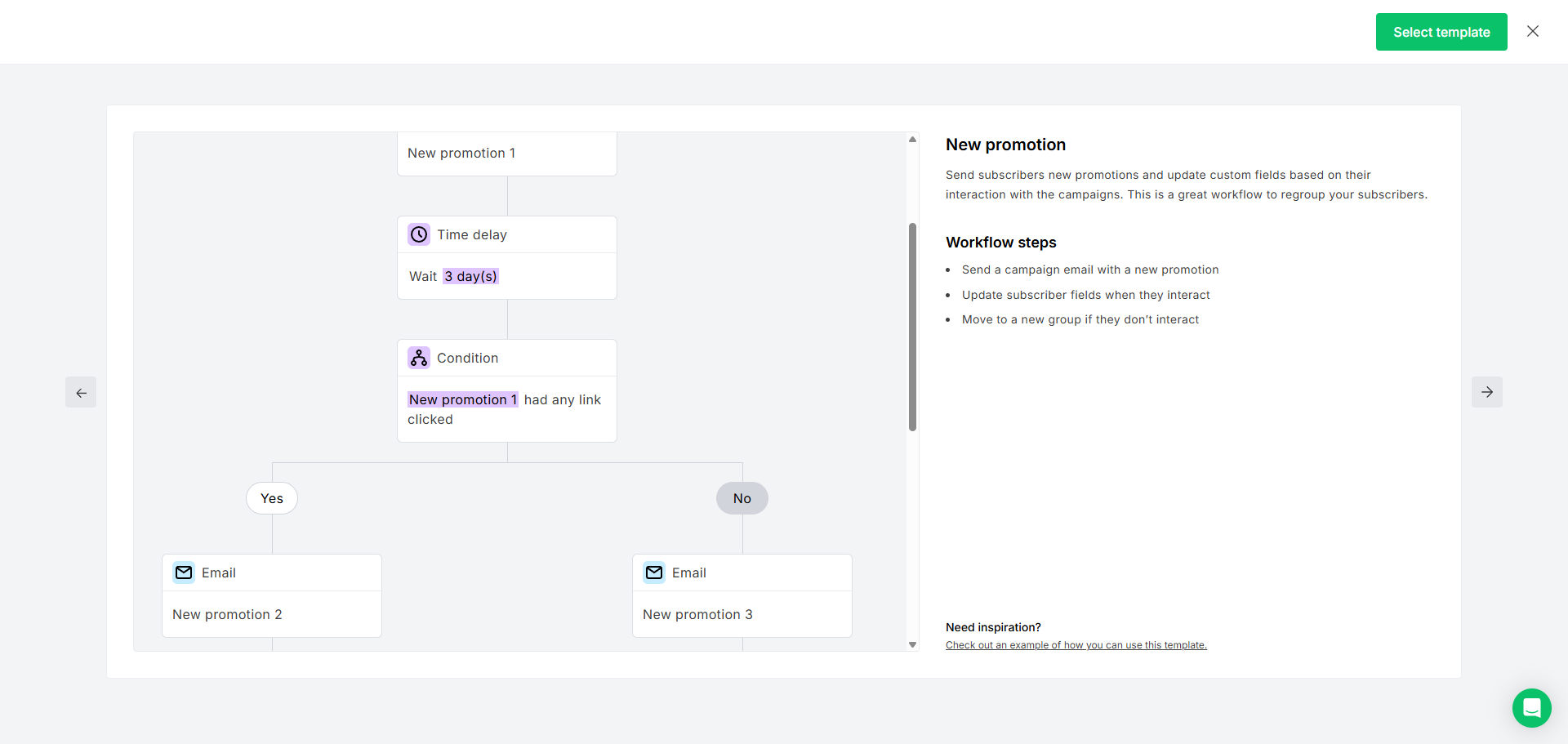
MailerLite's automation builder is easy to understand. The visual workflow structure can show delays, conditions, actions, and Yes/No paths without turning a basic sequence into a technical operations project.

That is enough for common workflows such as welcome sequences, lead magnet delivery, simple promotional follow-ups, re-engagement campaigns, date-based paths, and basic subscriber nurturing.

The important limitation is depth. MailerLite is not trying to be an enterprise lifecycle automation platform, and complex product-event logic should be tested against your actual requirements before choosing it.

  • Best use case: clear automations with a few logical steps and readable branching.
  • Not ideal for: many entry points, deep scoring, advanced product-event triggers, or complex multi-path journey orchestration.
MailerLite automation workflow preview showing delay, condition, and branching paths.
View full-resolution screenshot

Verified evidence

MailerLite's automation builder uses a visual sequence structure with delays, conditions, and Yes/No branches.

Observed
June 2026
Evidence point
Readable automation structure for simple sequences.

Workflow suitability

Landing pages and forms: useful for simple lead capture

MailerLite's landing page and form builders follow the same general design logic as the email editor: visual controls, blocks, previews, and a relatively low learning curve.

That matters for creators and small businesses that do not want separate tools for every asset. A simple workflow can stay inside MailerLite: create a landing page, add a form or offer section, capture subscribers, and trigger an email follow-up.

The safe interpretation is focused lead capture. We are not treating MailerLite as a full website builder replacement or making strong claims about SEO settings, custom domains, checkout modules, or large-scale page organization without additional verification.

  • Best use case: lead magnets, waitlists, newsletter signup pages, course interest pages, and simple promotion pages.
  • Needs verification: landing page SEO settings, custom domain setup, product modules, and conversion reporting.
MailerLite landing page editor showing content blocks and page preview.
View full-resolution screenshot

Verified evidence

The landing page builder uses a familiar block-based editor for creating simple campaign pages.

Observed
June 2026
Evidence point
Visual landing page creation for focused campaign pages.

Workflow suitability

Audience management: clear enough for lean teams

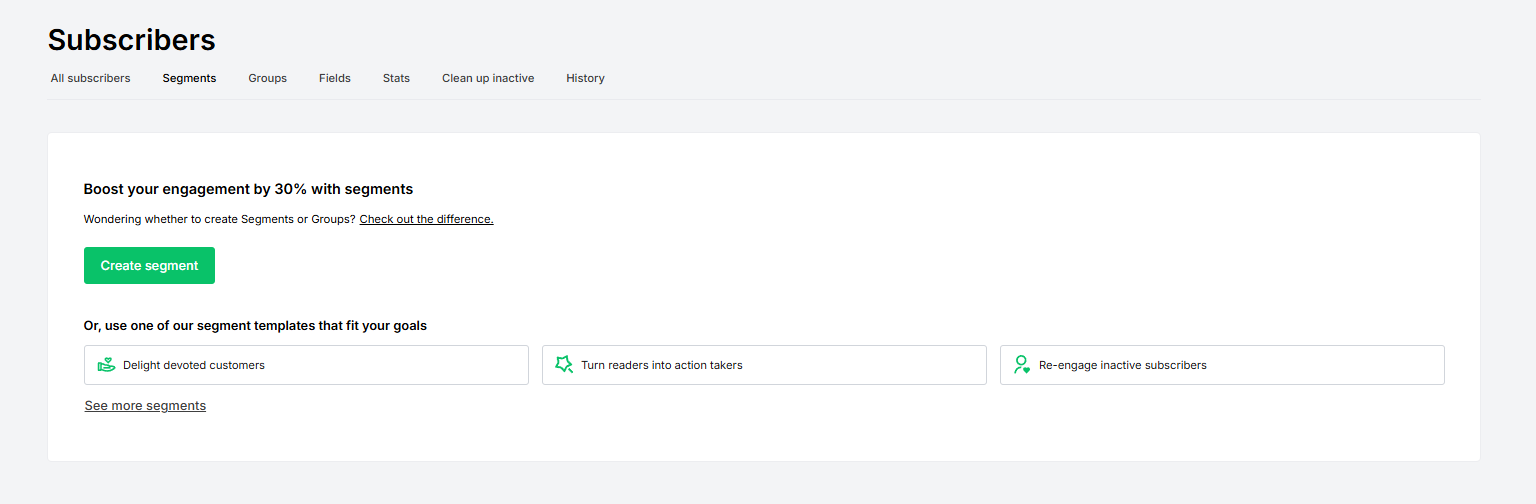
MailerLite exposes subscribers, groups, and segments in the same workspace as campaigns and forms. That keeps the list-building workflow understandable for a solo operator or small team.

This is useful for basic audience organization, but it should not be confused with a full CRM. MailerLite can help manage subscribers and segments; it does not replace deal stages, account ownership, call notes, or sales pipeline tracking.

  • Best use case: organizing subscribers around newsletters, lead magnets, forms, and simple campaign follow-up.
  • Not ideal for: sales-owned CRM workflows or account-based pipeline management.
MailerLite groups and segments screen.
View full-resolution screenshot

Verified evidence

Groups and segments support basic audience organization for email workflows.

Observed
June 2026
Evidence point
Basic grouping and segmentation are part of the audience workflow.

Workflow suitability

Reporting: clean list visibility, not advanced attribution

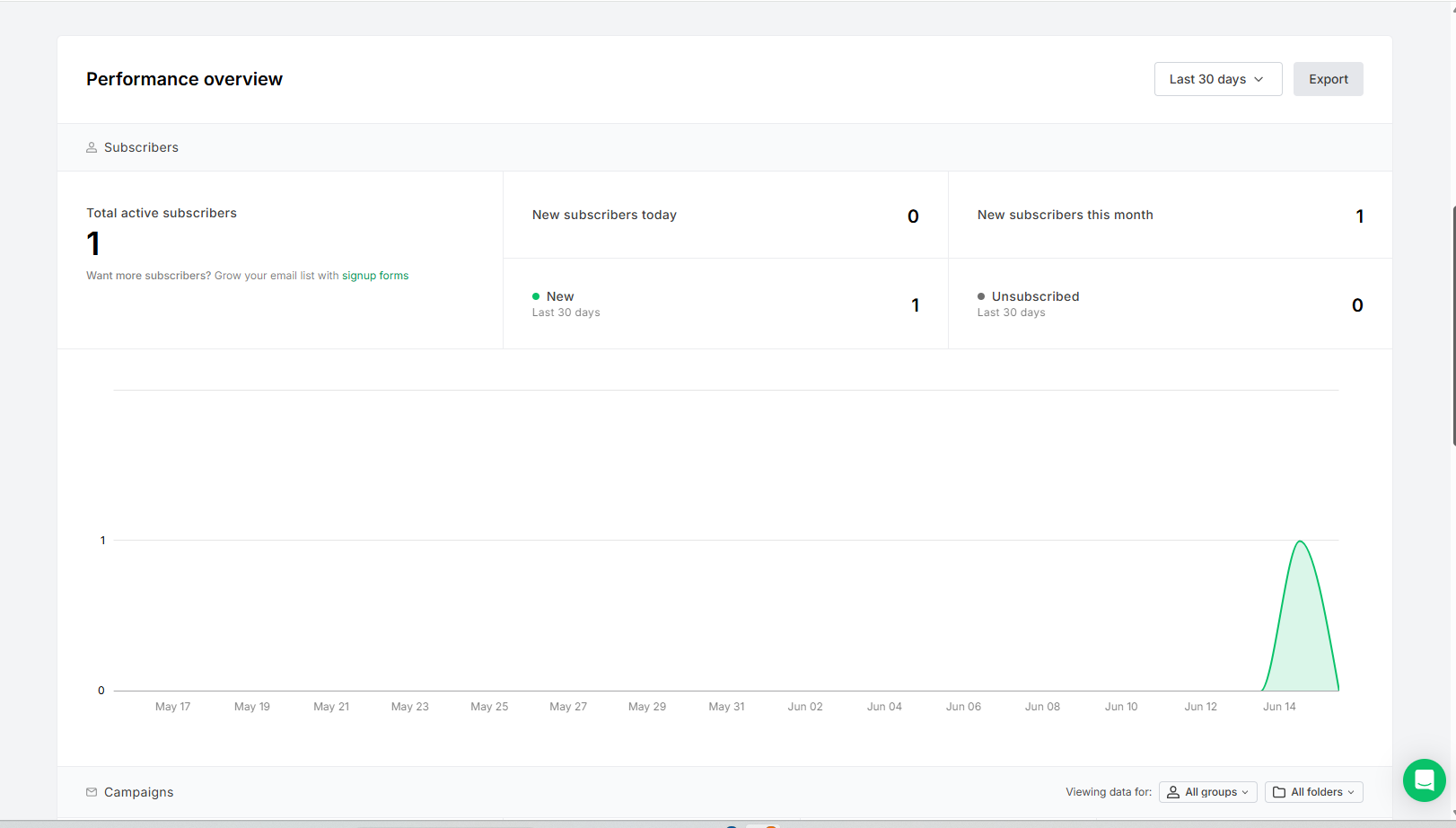
The performance overview screen is clean and easy to scan. It supports a practical list-level view of subscriber growth and essential activity rather than overwhelming users with advanced analytics layers.

That is enough for many creators and small teams, but this draft does not claim advanced revenue attribution, ecommerce analytics, click maps, or deliverability performance. Those areas need separate evidence with the relevant integrations connected.

  • Best use case: basic list growth and campaign visibility.
  • Needs verification: revenue attribution, detailed ecommerce reporting, click maps, and deliverability outcomes.
MailerLite performance overview showing subscriber metrics and list growth chart.
View full-resolution screenshot

Verified evidence

MailerLite's performance overview focuses on subscriber growth and essential list activity.

Observed
June 2026
Evidence point
Basic list-level reporting is visible.

Pricing reality check

The Free plan is now a testing tier, not a long-term growth plan

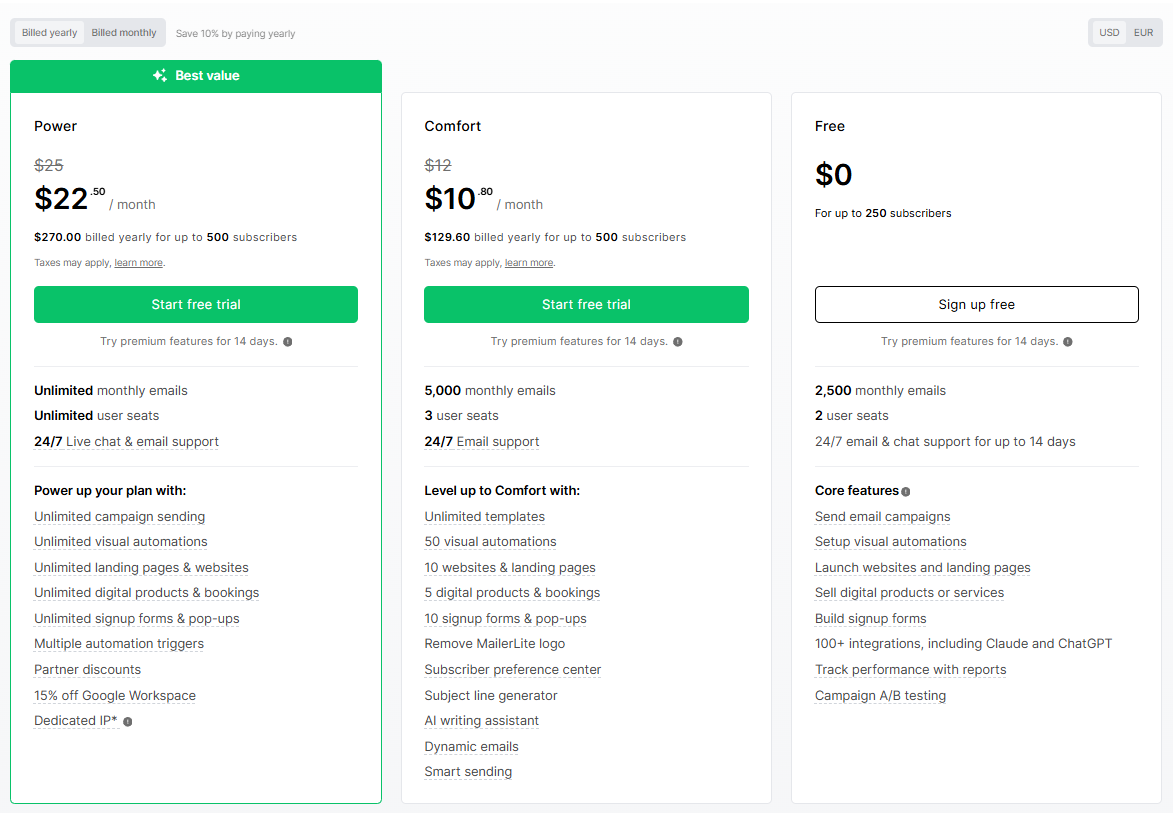
Pricing is the part of MailerLite that older reviews are most likely to get wrong. The current pricing structure we checked shows Free, Comfort, Power, and Enterprise plan families. Compare the current tiers in our MailerLite Free vs Comfort vs Power guide.

The Free plan is best understood as a test environment. The current public pricing screen shows up to 250 subscribers and 2,500 monthly emails, which is enough to explore the interface and build a small proof of concept, but not enough for a serious growing newsletter.

Comfort starts at $12/month and Power starts at $25/month on the current pricing screen we captured. Treat those as dated research notes and verify live pricing before choosing a plan.

  • Do not rely on older reviews that describe a 500-subscriber or 12,000-email free tier as the current public offer.
  • The practical question is whether MailerLite's paid workflow saves enough time compared with separate tools for email, landing pages, forms, and basic automation.
MailerLite pricing page showing Free, Comfort, Power, and Enterprise plan options.
View full-resolution screenshot

Verified evidence

MailerLite's current pricing should be verified before choosing a plan, especially because older reviews may describe outdated free-plan limits.

Observed
June 2026
Evidence point
Current plan families and starting prices captured for this review.

Breakpoints

Where MailerLite starts to feel limited

The first breakpoint is list growth. Once your list approaches the Free plan subscriber or sending limits, MailerLite becomes a paid decision rather than a long-term free growth platform.

The second breakpoint is automation depth. MailerLite is strong for welcome flows and straightforward nurture sequences, but weaker if your growth system depends on complex triggers, deep scoring, or many conditional branches.

The third breakpoint is workflow ownership. If you need CRM pipeline stages, transactional product emails, native SMS, or advanced reporting in one unified dashboard, compare MailerLite carefully against tools built for those jobs.

  • Choose MailerLite for workflow simplicity, not enterprise breadth.
  • Test your real automation, reporting, and plan-limit needs before standardizing on it.

Practical use cases

Who gets the most value from MailerLite

Paid newsletter operators get a clean writing, sending, and subscriber management workflow without much enterprise complexity.

Digital product creators can use MailerLite around a lead magnet, waitlist, course page, or simple product promotion, as long as they verify any product, booking, checkout, or payment requirements in their own account.

Small businesses can use it for announcements, promotions, customer updates, and simple lead nurturing. It is especially appealing when one person owns most marketing tasks.

  • Best overall fit: creators, newsletter publishers, solopreneurs, and small businesses that prioritize speed and clarity.
  • Consider alternatives if your workflow depends on high-volume free sending, native SMS, transactional email, full CRM functionality, or advanced lifecycle automation.

Pricing summary

Free, Comfort, Power, and Enterprise

Read the pricing guide

The current pricing evidence we captured shows Free, Comfort, Power, and Enterprise plan families. Free is best treated as a testing tier with up to 250 subscribers and 2,500 monthly emails. Comfort starts at $12/month and Power starts at $25/month on the captured pricing screen, but pricing can change, so verify the live page before choosing a plan.

Free

Best for testing the product and running a very small list. Verify the current 250-subscriber and 2,500-monthly-email limits before relying on it.

Comfort

Best for solopreneurs and small teams ready to pay for a working email system. Sending limits and pricing scale by subscriber tier.

Power

Best for busier creators and marketers with more active campaigns, higher usage, and a need for more feature flexibility.

Enterprise

Best for larger databases and high-volume teams that need custom pricing, support, or sales-assisted setup.

Final verdict

Choose MailerLite for lean email marketing, not full CRM ownership

MailerLite is a strong choice for creators, newsletter publishers, solopreneurs, and small businesses that want a clean email marketing system without enterprise complexity. Its biggest advantage is workflow simplicity: you can move from landing page to signup form to newsletter to simple automation without constantly switching tools. The main caution is pricing and limits. Evaluate it as a paid tool, verify the current plan limits, and compare alternatives if your workflow depends on high-volume free sending, native SMS, transactional product emails, full CRM functionality, or advanced lifecycle automation.

MailerLite FAQ

Is MailerLite good for beginners?
Yes. MailerLite is one of the easier email marketing tools to understand because its dashboard, editor, and automation builder are visually clear. It is especially beginner-friendly for newsletters, simple forms, and basic automation.
Is MailerLite still a good free email marketing tool?
It is good for testing, but the current Free plan should be treated as a sandbox for trying the platform before choosing a paid plan, not as a long-term list-building plan.
What is MailerLite best at?
MailerLite is strongest at clean newsletter creation, simple email automation, landing pages, forms, and lightweight creator workflows.
What are MailerLite's biggest limitations?
Its main limitations are free-plan constraints, lightweight CRM functionality, limited advanced automation compared with enterprise tools, and the fact that transactional email and SMS sit outside the core MailerLite marketing workflow.
Is MailerLite good for newsletters?
Yes. It is a strong choice for newsletters because the editor is clean, the workflow is simple, and the platform does not bury users under unnecessary enterprise features.
Is MailerLite good for ecommerce?
It can be useful for simple ecommerce promotions and list-building workflows, especially when paired with integrations. Advanced ecommerce attribution and deep customer lifecycle automation should be tested with your actual store setup before choosing it.
Does MailerLite include automation?
Yes. MailerLite includes visual automation features for welcome sequences, lead magnet delivery, simple promotions, and basic nurture campaigns. More complex automation needs should be tested carefully against plan limits.
Does MailerLite replace a CRM?
No. MailerLite is an email marketing and audience platform, not a full CRM. It can help manage subscribers and segments, but it does not replace deal pipelines, sales ownership, lead scoring, or account-based sales workflows.
Does MailerLite include landing pages?
Yes. MailerLite includes a landing page builder for simple campaign pages, lead magnets, waitlists, and signup pages. It should not be treated as a replacement for a full website builder.
Who should not choose MailerLite?
Avoid MailerLite if you need native SMS marketing inside the same campaign builder, advanced CRM workflows, complex multi-trigger lifecycle automation, high-volume free sending, or deep revenue attribution.

About the reviewer

Portrait of Kyle, software reviewer at AI Tool Savings

Kyle

Software reviewer at AI Tool Savings

Kyle reviews software for creators, small teams, and lean marketing teams, focusing on buyer fit, workflow impact, pricing risk, setup effort, and evidence readers can verify before choosing a plan.

View Kyle’s profile